TinyButStrong Error in field [var.media_title...]: the key 'media_title' does not exist or is not set in VarRef. (VarRef seems refers to $GLOBALS) This message can be cancelled using parameter 'noerr'.
TinyButStrong Error in field [var.media_title...]: the key 'media_title' does not exist or is not set in VarRef. (VarRef seems refers to $GLOBALS) This message can be cancelled using parameter 'noerr'.
TinyButStrong Error in field [var.media_title...]: the key 'media_title' does not exist or is not set in VarRef. (VarRef seems refers to $GLOBALS) This message can be cancelled using parameter 'noerr'.
TinyButStrong Error in field [var.media_title...]: the key 'media_title' does not exist or is not set in VarRef. (VarRef seems refers to $GLOBALS) This message can be cancelled using parameter 'noerr'.
TinyButStrong Error in field [var.media_title...]: the key 'media_title' does not exist or is not set in VarRef. (VarRef seems refers to $GLOBALS) This message can be cancelled using parameter 'noerr'.
TinyButStrong Error in field [var.media_title...]: the key 'media_title' does not exist or is not set in VarRef. (VarRef seems refers to $GLOBALS) This message can be cancelled using parameter 'noerr'.
TinyButStrong Error in field [var.media_desc...]: the key 'media_desc' does not exist or is not set in VarRef. (VarRef seems refers to $GLOBALS) This message can be cancelled using parameter 'noerr'.
TinyButStrong Error in field [var.media_url...]: the key 'media_url' does not exist or is not set in VarRef. (VarRef seems refers to $GLOBALS) This message can be cancelled using parameter 'noerr'. [var.media_title;onformat=retitle] :: 哇哇3C日誌
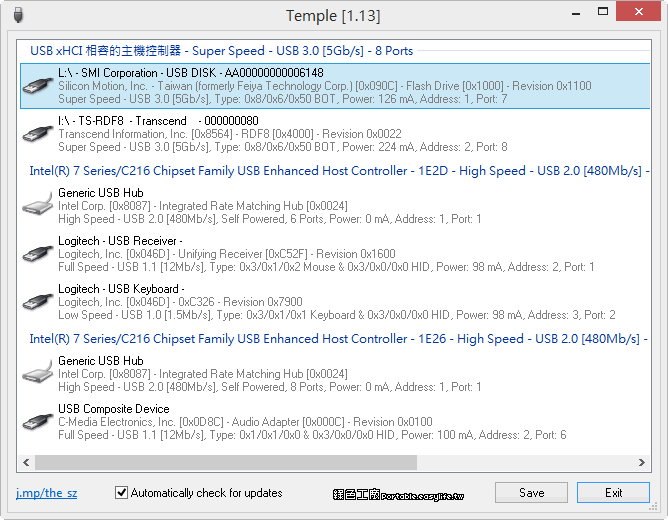
USBView (USB System Viewer) is a free diagnostic tool from Microsoft that displays detailed information about all USB controllers and connected devices on a Windows system. Originally included in the Windows Driver Kit (WDK), it’s now available as a
有視覺方法和軟體可以識別 USB 連接埠的版本。 連接器上的顏色、符號和針腳數量有助於區分 USB 2.0、3.0 及更高版本。 裝置管理員等工具和免費程式可以輕鬆地在 Windows 內部執行準確的檢查。 許多 Windows 使用者都曾想知道他們的電腦的 USB 連接埠是什麼版本。 無論您是想最大限度地提高設備的傳輸速度,還是只是想確保週邊設備的兼容性,了解您的連接埠是 USB 2.0、3.0、3.1 還是更高版本都會對您的日常用戶體驗產生影響。 正確識別裝置上的 USB 連接埠版本不僅可以幫助您節省
USB Device Tree Viewer是根據微軟的 “USBView” 範例應用程式開發而來,該範例應用程式可在Windows Driver Development Kits中找到。 它的主要目的是快速、清晰地顯示電腦上所有USB集線器和連接埠的相關資訊,包括連接狀態、裝置詳細資料,以及與電腦和作業系統的相關資訊。 USB Device Tree Viewer的核心功能是以直觀的方式呈現USB裝置樹狀結構。 使用者可以輕鬆地檢視和理解所有已連接的USB裝置之間的層次結構,這對