PicoTorrent 種子/磁力下載器,小巧強悍執行快速
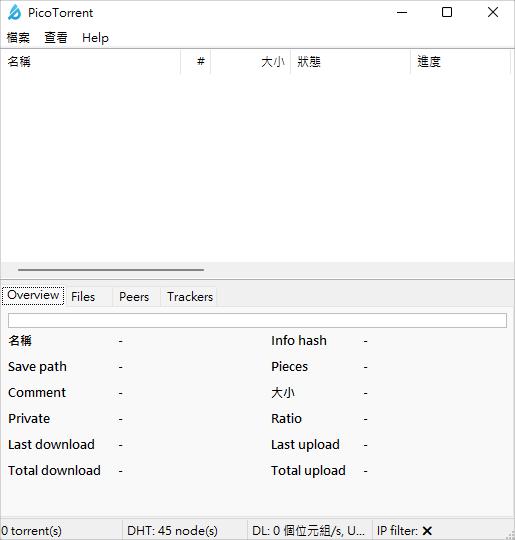 首先到文章後方下載 PicoTorrent 免安裝版及安裝版,小編這編用免安裝版作為示範,下載之後解壓縮壓縮檔,直接點擊 PicoTorrent 開啟軟體後如上圖。
 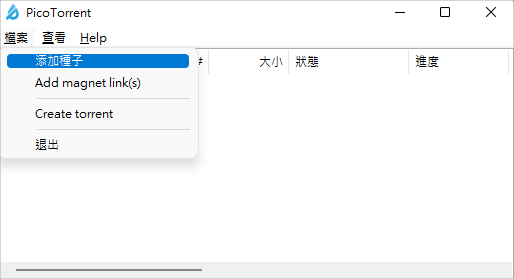 然後按下左上方「檔案」找到「添加種子」。
 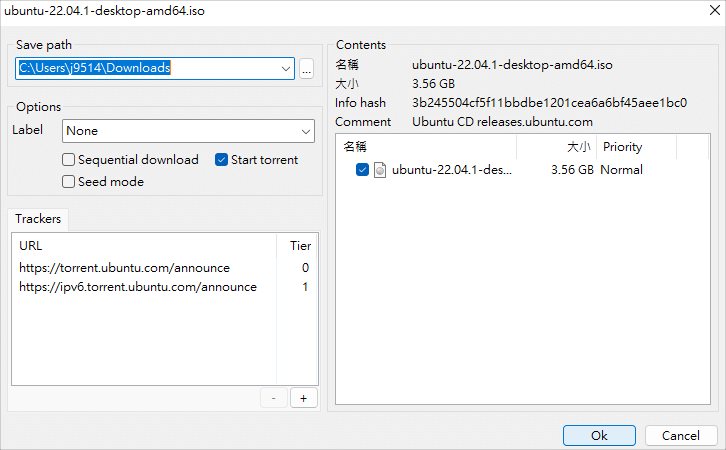 然後選擇儲存位置後,按下右下角 OK 即可開始下載。
 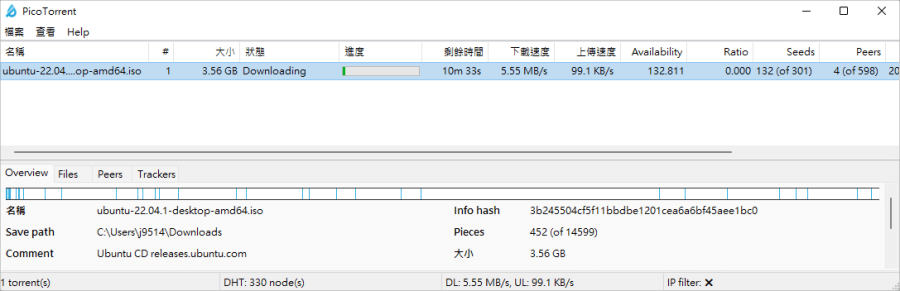 設定代理連線很容易,PicoTorrent 還支援 I2P、SOCKS4、SOCKS5 和 HTTP(S) 代理以及強加密,整體來說體積輕巧、執行快速,是一款非常優質的種子及磁力下載工具,連結放在下方,推薦各位收下。https://picotorrent.org/x86 免安裝版:
PicoTorrent 0.25.0 x86.7z(GOOGLE下載)
PicoTorrent 0.25.0 x86.7z(1DRV下載)
PicoTorrent 0.25.0 x86.7z(MEDIAFIRE下載)
PicoTorrent 0.25.0 x86.7z(RAPIDGATOR下載)
PicoTorrent 0.25.0 x86.7z(MEGA下載)
檔案大小:4.47 MBx64 免安裝版:
PicoTorrent 0.25.0 x64.7z(GOOGLE下載)
PicoTorrent 0.25.0 x64.7z(1DRV下載)
PicoTorrent 0.25.0 x64.7z(MEDIAFIRE下載)
PicoTorrent 0.25.0 x64.7z(RAPIDGATOR下載)
PicoTorrent 0.25.0 x64.7z(MEGA下載)
檔案大小:5.08 MB