讓Man Page充滿色彩
- linux作業系統安裝
- linux command
- linux 認證
- linux driver
- linux系統
- linux下載安裝
- linux cd ~
- linux 下載
- Linux 驅動程式
- linux 指令大全檔案
export LESS_TERMCAP_mb=$'\E[1;31m' # begin blinking
export LESS_TERMCAP_md=$'\E[4;32m' # begin bold
export LESS_TERMCAP_me=$'\E[0m' # end mode
export LESS_TERMCAP_so=$'\E[0;31m' # begin standout-mode - info box
export LESS_TERMCAP_se=$'\E[0m' # end standout-mode
export LESS_TERMCAP_us=$'\E[0;33m' # begin underline
export LESS_TERMCAP_ue=$'\E[0m' # end underline
export LESS_TERMCAP_md=$'\E[4;32m' # begin bold
export LESS_TERMCAP_me=$'\E[0m' # end mode
export LESS_TERMCAP_so=$'\E[0;31m' # begin standout-mode - info box
export LESS_TERMCAP_se=$'\E[0m' # end standout-mode
export LESS_TERMCAP_us=$'\E[0;33m' # begin underline
export LESS_TERMCAP_ue=$'\E[0m' # end underline
export過後的效果就會如下圖顯示
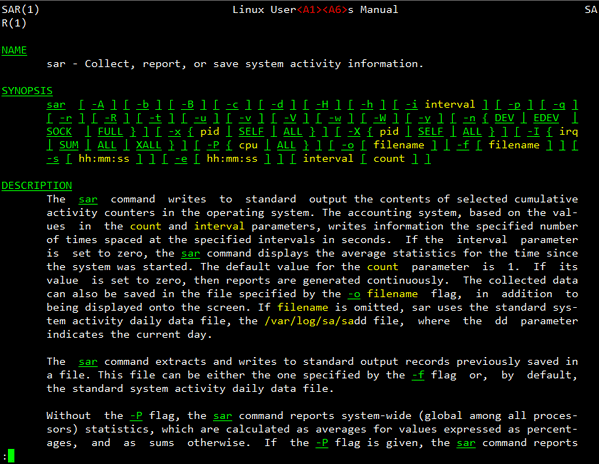 我有試著調整每一個變數,然後觀察顏色的變化,最後整理的結果就是還是不要太花俏,能把一些單字會重點凸顯就好,總比一片白底黑字來的好!若您以後也想都如此使用,建議可以把以上的變數加到個人的環境變數設定內,譬如您是使用bash,就加到~/.bashrc囉!參考文章
http://linuxtidbits.wordpress.com/2009/03/23/less-colors-for-man-pages/
http://huenlil.pixnet.net/blog/post/24675360
http://nelson.pixnet.net/blog/post/24671189